 TubeWrist
TubeWrist › Guides › Landscape video
Watch videos in landscape on Apple Watch
Updated 23 October 2026
The Apple Watch screen is taller than it is wide, and most video is wide. Playing it sideways along the long edge of the screen gives you a much bigger picture.
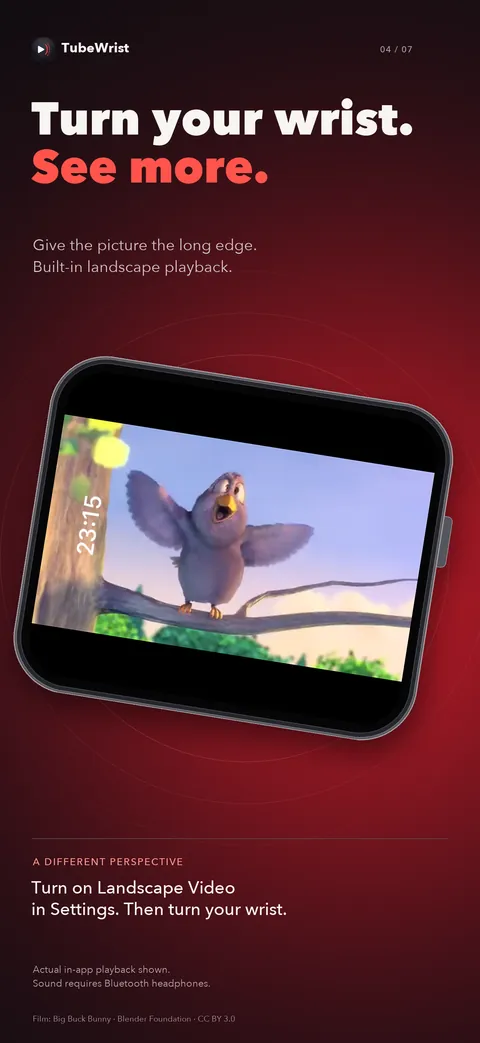
Step by step
- Turn on Landscape Video. In TubeWrist, open Settings ▸ Playback and switch on Landscape Video.
- Play and turn your wrist. Play any video. The picture runs along the long edge of the screen: 27% wider, with 62% more picture area. Turn your wrist to watch.
- Flip it if it's upside down. If the picture is upside down for the wrist you wear your watch on, switch on Flip Direction, just below Landscape Video.
Go full screen
Tap Full Screen in the button row under any video. The controls fade on their own; tap once to bring them back.
Why the picture is capped at 480p
Even in landscape, the largest Apple Watch display is about 416×502 points. 720p or 1080p would be detail the screen can't show, so TubeWrist doesn't spend your battery and data on it.
 $1.99 · 3 days fully unlocked · watchOS 10+